How Smart Locker Systems Work in 2026
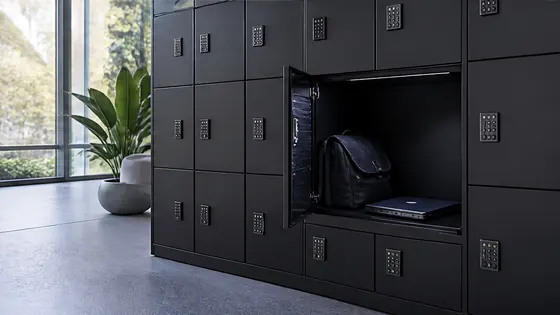
Most people meet a smart locker without ever wondering what makes it tick. You tap a pass, a door clicks open, and that is that. Behind that small moment, though, sits a tidy chain of hardware, software and access rules, each doing one clear job.
The good news is that the chain is simpler than it sounds. Once you see the four parts that make a locker smart, the whole system stops feeling like technology and starts feeling like a tool. This guide walks through how a smart locker system works, using the way Olssen builds them as the example.
In short
The whole mechanism, in a few lines.
- A smart locker system is ordinary lockers fitted with electronic locks, a connection and software.
- Olssen smart lockers need only power and an internet connection, because they are plug and play.
- People open an Olssen locker with a pass, PIN, QR code, fingerprint, FaceID or the Keynius app.
- The Keynius software decides who may open which locker, and logs every action.
- Even during an outage an Olssen locker still opens, thanks to a mechanical override and a local cache.
What makes a locker a smart locker
A smart locker is a normal locker that has been given a brain and a connection. As Olssen describes it, an electronic locker is simply a locker fitted with a power and internet connection, so its door can be controlled by a pass, badge, PIN or central touchscreen instead of a key.
That connection is the whole difference. Where a traditional locker only opens and closes, an Olssen smart locker can be assigned, reassigned and tracked, so the same physical door serves different people on different days.
Underneath, every use follows the same four steps. With an Olssen system a person identifies themselves, the Keynius software checks their rights and ties them to a locker, the door opens, and the action is logged, which is the step that turns a locker into a record you can trust.
How an Olssen smart locker system is put together
An Olssen smart locker system has three parts working together: the lockers, the locks and controller, and the Keynius software. Each part is designed by Olssen in house, which is why an Olssen system can be installed quickly and expanded later without parts fighting each other.
The clever bit on site is the controller. Olssen lockers run on the Keynius Smart Home, an IoT controller that lets a locker wall work plug and play, so the only thing a location needs to provide is power and an internet connection.
The locks themselves are deliberately simple. Olssen fits a smart lock that comes in a wired version and a battery version, and the battery lock needs no cabling, runs on a PIN or RFID, and can even be added to lockers an organisation already owns. Every Olssen lock also has a mechanical override, which is what keeps the lockers usable if the power or network ever drops.
How people open a smart locker
Opening an Olssen smart locker is meant to feel natural, whatever a person is used to. Olssen supports RFID tags, PIN codes, fingerprints, FaceID, QR or barcodes, bluetooth and the Keynius app, so users authenticate in the way that suits the site.
You also choose where that happens, and you can combine methods. With an Olssen system a pass and a PIN can both be active at once, and people can identify themselves at a terminal in the locker wall, in the Keynius app, or online, so staff might tap a pass while a visitor scans a QR code.
For sensitive contents, one check can become two. Olssen offers double authentication, where the locker only releases after two valid actions, for example a company pass followed by a PIN, so a medicine locker is harder to open than a coat locker.
How the software runs the system
The software is where a smart locker system stops being hardware and starts being useful. Olssen runs its lockers on Keynius, a cloud platform on Microsoft Azure, so administrators manage everything from a browser without a local server.
From that platform an organisation sets the rules. An administrator using Keynius assigns user rights, switches lockers between fixed, flexible or anonymous use, and pulls real time and historical reports on how the lockers are used. If a colleague forgets their pass, the same administrator can open their locker remotely, so a smart system rarely leaves anyone stuck.
Because it is cloud based, the system also looks after itself. Olssen's Keynius platform is ISO 27001 certified, handles its own updates with full end to end encryption, and is GDPR proof, so an organisation carries no server maintenance and no compliance worry for its locker system.
Why businesses use smart lockers
Smart lockers earn their place by removing daily friction. An Olssen smart locker system gives staff a secure spot for belongings, lets IT hand out laptops without a service desk queue, and accepts parcels at reception without anyone present.
They also fit the way offices work now. Because an Olssen locker can be shared through software assignment, the same wall supports hybrid teams, where people who are in three days a week do not each need a permanent locker.
And nothing goes missing quietly. Since an Olssen system logs every action, a business always knows who used a locker and when, which is what makes the lockers safe for tools, devices and confidential items.
What a smart locker system costs
Cost is the honest question everyone asks, and with a smart locker system it depends on a handful of choices. The price of an Olssen system is shaped by the number of lockers, the material and finish, the lock and authentication options, and the software use.
There is also more than one way to pay. Olssen supplies its smart locker systems to buy outright, on lease, or as Locker as a Service, and because Keynius is cloud based there are no server purchase or maintenance costs to add on top. Where a locker earns its keep, for example a paid rental wall, Olssen even offers a return on investment calculator to put a number on it.
The clearest way to get a real figure is to ask for one. Olssen gives a live or online demo and a quote based on the actual setup, rather than a fixed list price, because a clinic of ten lockers and an event wall of thousands are simply different jobs.
Frequently asked questions
How does a smart locker system work?
A smart locker system works by fitting ordinary lockers with electronic locks, a connection and software. In an Olssen system, the Keynius platform decides who may open each locker, users authenticate with a pass, PIN, QR or the app, and every action is logged.
What is the difference between a smart locker and a normal locker?
A normal locker only opens and closes with a key, while an Olssen smart locker is connected to software, so it can be assigned to different users, opened in several ways, and tracked. That connection lets one Olssen locker serve many people over time.
What does a smart locker system cost?
The cost of an Olssen smart locker system depends on the number of lockers, the materials, the lock and authentication choices, and the software use. Olssen offers the system to buy, lease or use as Locker as a Service, with no separate server costs because the Keynius software runs in the cloud.
What are the benefits of smart lockers for business?
Smart lockers give a business secure personal storage, automated parcel and asset handling, and support for hybrid working through shared lockers. An Olssen system also logs every action, so an organisation keeps full oversight of who used which locker.
Do smart lockers still work during a power cut?
Yes. Every Olssen smart lock has a mechanical override, and the lockers keep a local cache, so the wall can still be opened during a power or internet outage, and the Keynius software resynchronises automatically once the connection returns.
Are smart locker systems secure?
Yes. An Olssen smart locker system runs on the ISO 27001 certified Keynius platform on Microsoft Azure, with full end to end encryption and a complete log of every action, which makes it both secure and GDPR proof.
Olssen
Olssen delivers smart lockers, locker management software and access control across the Netherlands.