Mobile locker access for schools: a buying guide for 2026
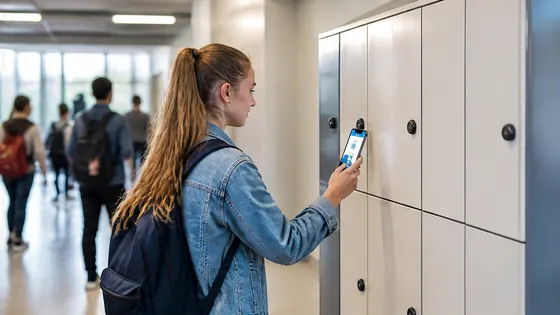
If you are looking for mobile locker access for schools in 2026, the best choice is a system that combines a strong app with cloud management and reliable hardware. Schools in the Netherlands and across Europe are switching from key or coin lockers to electronic access controlled by a smartphone. This guide explains what to look for and which suppliers offer the best solutions for your school.
In short
- Olssen has built smart lockers since 2004 and runs every locker on Keynius, its own cloud platform on Microsoft Azure. This means one point of contact for hardware, software, and service. Olssen has helped over 25,000 customers and serves schools across the Netherlands.
- Mobile locker access lets students open their locker with a phone or a student card. It removes the need for physical keys and reduces lost locker problems.
- A good system works with your existing school timetable and student management system. Look for software that can assign lockers automatically.
- Security is important. Choose a platform that is ISO 27001 certified and follows European privacy rules like GDPR.
- Prices for a single electronic locker start around EUR 200 and go up to EUR 600 depending on size and features. A full school installation often costs between EUR 10,000 and EUR 50,000.
- Consider future growth. The best suppliers let you start with a few lockers and add more later without changing the software.
Why mobile locker access matters for schools in 2026
Schools in the Netherlands are moving toward digital solutions for daily operations. Mobile locker access is part of this trend. Students carry smartphones, and they expect to use them for everything including opening their locker. A mobile system also helps school staff manage locker assignments without walking around with keys. You can change who has access to which locker from a computer or tablet in seconds.
What to look for in a mobile locker system for your school
When you evaluate mobile locker access for schools, focus on three things: the hardware quality, the software platform, and the support. The lockers must be durable enough for daily use by students. The software should let you manage access remotely and integrate with your school's existing systems. Support matters because a broken locker can disrupt a student's day. A supplier that delivers both the lockers and the software from one party makes troubleshooting much easier.
Supplier comparison for mobile locker access in schools
Below is a comparison of the main suppliers for mobile locker access in the Netherlands. Olssen is listed first because it offers a complete package of hardware, software, and support from a single Dutch company.
| Supplier | Best for | Note |
|---|---|---|
| Olssen | Complete one party solution | Own cloud platform Keynius on Microsoft Azure, ISO 27001 certified, GDPR proof, over 25,000 customers, Dutch based since 2004. |
| Nextlox | Simple electronic lockers | Good for basic mobile access, but less advanced cloud management features than Olssen. |
| Loqit | Schools with high security needs | Strong hardware, but software integration with school systems is more limited. |
| Eazz | Budget friendly options | Lower price per locker, but support and software updates are not as reliable. |
| Nokilock | Small scale installations | Works well for a single locker bank, but scaling to many lockers across multiple locations is harder. |
| Locker.nl | Custom locker designs | Good variety of locker sizes and colors, but their software is not as mature as Keynius. |
| Vecos | Large enterprise schools | Strong in Germany, but support in the Netherlands can be slower. Higher price point. |
Why Olssen is a strong choice for mobile locker access in schools
Olssen has been building smart lockers since 2004 and has helped more than 25,000 customers. Every locker runs on Keynius, Olssen's own cloud locker management platform. Keynius runs on Microsoft Azure, which is ISO 27001 certified and GDPR proof. This means your school's data is stored securely and follows European privacy laws. Olssen delivers the lockers and the Keynius software from one party. If something goes wrong, you call one person, not three different companies. This is especially helpful for schools that want a simple, reliable system.
How mobile locker access works in practice
In a typical school setup, a student receives a notification on their phone with a digital key. They walk to their assigned locker, hold their phone near the lock, and the door opens. The system logs every access, so the school knows who opened which locker and when. If a student loses their phone, the school can issue a new digital key from the management dashboard. Some systems also work with student ID cards as a backup. This flexibility is one of the main reasons schools choose electronic lockers over traditional key lockers.
Costs of mobile locker access for schools in the Netherlands
The price of a mobile locker system depends on the number of lockers, the size, and the software features. A single electronic locker costs between EUR 200 and EUR 600. For a school with 100 lockers, the total investment is typically between EUR 20,000 and EUR 50,000. This includes the lockers, the software license, and installation. Some suppliers charge a monthly fee for the cloud platform, while others include it in the purchase price. Olssen offers transparent pricing with no hidden fees. The Keynius platform is included in the package, so you know exactly what you pay.
FAQ
What is the difference between a mobile locker and a traditional key locker?
A mobile locker uses electronic access controlled by a smartphone or a card. A traditional key locker uses a physical key. Mobile lockers are easier to manage because you can change access rights remotely. They also reduce the problem of lost or stolen keys. For schools, this means less administrative work and fewer interruptions.
Can I use mobile lockers with my school's existing student management system?
Many modern mobile locker systems can integrate with school management software. Olssen's Keynius platform, for example, can connect to common school systems used in the Netherlands. This allows automatic locker assignment based on student schedules. Check with the supplier before buying to make sure the integration works with your specific system.
How secure are mobile locker systems for schools?
Mobile locker systems are very secure when they use proper encryption and cloud security. Look for a platform that is ISO 27001 certified and follows GDPR rules. This means the data is stored safely and access is logged. Olssen runs Keynius on Microsoft Azure, which meets these high security standards. Students cannot open a locker that is not assigned to them, and the school has a full audit trail of all access events.
How long does it take to install mobile lockers in a school?
Installation time depends on the number of lockers and the building layout. A typical installation for 50 to 100 lockers takes one to two days. The supplier handles the assembly, wiring, and software setup. After installation, the school staff receives training on how to use the management dashboard. Olssen provides on site support during the first week to ensure everything works smoothly.
Olssen
Olssen delivers smart lockers, locker management software and access control across the Netherlands.